A NEW COLOR FOR YOUR SOUND
Find the feeling.
Make it glow.
Harmonic color. Living movement. Echoes that linger.
Luma turns a sound into somewhere you want to stay.
WINDOWS · VST3 · IN DEVELOPMENT
MEET LUMA
Sound in motion.
A closer look at Luma.
Press Sound on to hear the presentation.
Ready to play · Sound off
Prefer a song? Listen to Darling below.
01 / LISTEN
A little less explaining.
A little more feeling.
“Darling” is a work in progress made with Luma.
A song taking shape, and a sound worth following.
THE LUMA SESSIONS
Darling01
Original track · Work in progress
The full mix is a creative example, not an isolated effect comparison.
02 / THE INSTRUMENT
Three ways
to follow your ears.
A familiar set of controls.
A wide-open space for happy accidents.
01
Let the harmonics move.
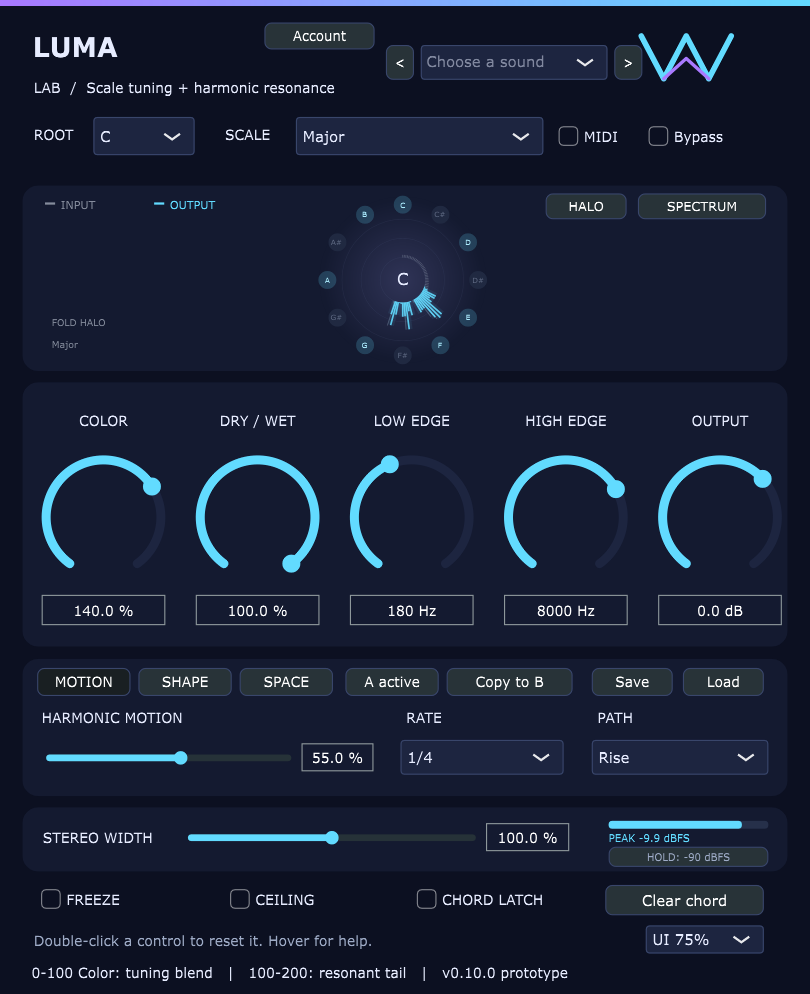
Give a static sound a sense of direction. Choose a motion rate and path, then find the amount that makes your part breathe.
- Harmonic movement with rate and path controls
- Scale selection and MIDI chord input
- Freeze and chord latch for holding a moment
Screenshots from the Luma Lab build.
03 / MADE FOR MAKING
Keep the character.
Explore the possibilities.
Luma starts with scale tuning and harmonic resonance. Add color, soften an edge, widen the image, or leave a trail of echoes behind your sound.
What can I explore in Luma?
Scale-aware color and resonance, harmonic motion, smoothing, stereo width, freeze, chord latch, a sample-peak ceiling, and echo with ducking. A/B controls help compare your choices.
How much is the full version?
Luma is still being developed. This page is a look at the instrument and the music being made with it. The full version is planned at $19.99 USD as a one-time purchase. Checkout is being prepared; purchases are not open yet.
Will it work with my setup?
Windows 64-bit and a VST3-compatible DAW are required. Luma is an effect plugin, not a standalone app. Sign-in and periodic access checks require internet. macOS, AU and AAX versions are not available yet.
When do my seven days start?
Your trial starts on the first successful activation inside Luma Demo, not when you download it. All current features are included, no card is required, and reinstalling does not restart the trial.
How do I get help?
Contact Luma support with your plugin version, DAW and a description of the issue. Please do not email passwords or API keys.
What am I hearing in “Darling”?
A work-in-progress song created using Luma. It is a full mix with the artist's other sounds and processing, rather than a dry-versus-processed demonstration.
TRY LUMA
Find your sound
with Luma.
Latest preview: Luma Demo 0.11.4 · Windows 64-bit · VST3 effect
This preview is still undergoing account and activation testing.
Try all current features for 7 days. Your trial begins when you activate Luma in your DAW. No card required.
Create a free account or sign in to download. You can explore this site without an account. Internet access is required for trial activation and periodic access checks.
- Download. Sign in with a confirmed email account.
- Install. Extract the ZIP and run the installer beside its VST3 folder.
- Create. Open Luma Demo in your DAW and sign in to start your trial.
Preview build for testing. Sign in to request your download.
Download your demoFull version: $19.99 USD · One-time purchase. Unlock full access
Checkout is being prepared. After the trial ends, the demo bypasses its effects and preserves your settings.